Desktop version of TweetDeck
Atomic TweetDeck is an open-source Electron-based desktop alternative to the widely popular and powerful Twitter tool called TweetDeck. This social networking utility was developed after TweetDeck's Windows app got shut down last April 2016. It's now only accessible online through various web browsers.
Even when its user interface is identical to TweetDeck, this standalone program still offers its own unique features. This free-of-charge social and communication solution offers a portable binary file that requires no installation and can easily be moved as well as accessed in any location.
Features unique to the program
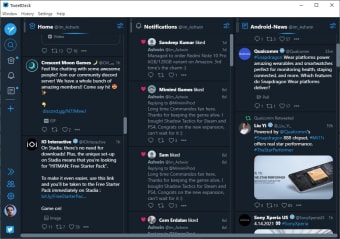
Atomic TweetDeck provides almost the same user interface as TweetDeck. With this, users can expect that the navigation experience that both tools serve is similar. For instance, when you clicked the three-dot button in the tweet, you can see the same set of options that the original app has. However, in addition to the TweetDeck-inspired features, you can also find extra menus in this program.
One noteworthy feature is the ability to open media content directly. With this added function, you no longer need to access your web browser to view a picture or play a video. When you right-clicked an image, it will show you options to copy the photo to the clipboard. By utilizing theTwitter's URL shortening service, you can also copy a link to the media. Note, however, that this is not applicable for copying text contents.
The program automatically refreshes your timeline. However, you can also do it manually by pressing both Ctrl and R keys. This social software is unobtrusive. When not in use, it sits quietly in your system tray while minimized. To toggle back to the window, either double-click on the tray icon or use its right-click menu.
Manage multiple Twitter accounts on desktop
Atomic TweetDeck is an ideal alternative if you want to easily access your multiple Twitter accounts straightly on the desktop without the need to open your web browser. If you are familiar with TweetDeck, using this app will be a breeze as they have a similar UI. Although, you can still experience some features that are unique to this desktop software only.